About

I'm a developer/designer and from time to time i release projects to the public.
iWOL

Wake on LAN, now on the App Store under Utilities!
A iPhone - iPod touch application that sends a WOL packet to a specific computer via the internet or LAN
Features
- Add as many computers as you want
- Works via the Internet
- LAN Broadcast
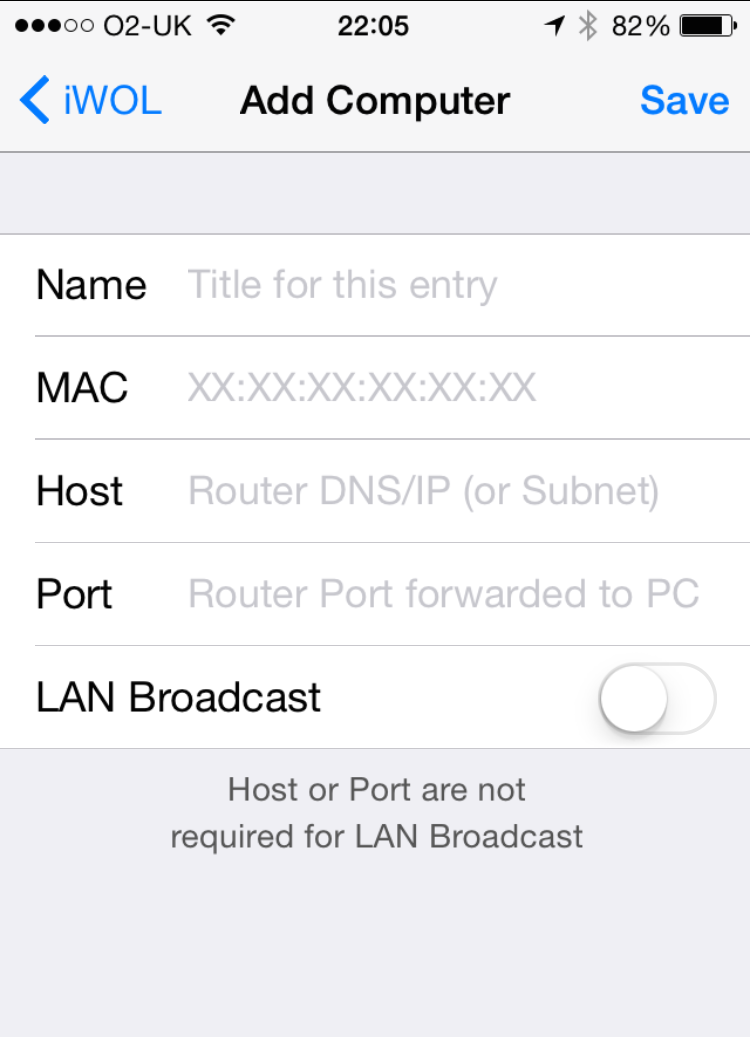
- Name: Can be anything you want here.
- MAC:
Windows
Go to START, RUN, CMD, and type IPCONFIG /ALL.
Find the PHYSICAL ADDRESS for the ethernet adapter.Enter this address in the format xx:xx:xx:xx:xx:xxMac OS X
System Preferences -> Network -> Ethernet -> Configure ->Ethernet -> Ethernet ID - Host: Enter the IP address assigned to your computer by your ISP or a DNS name if you have one set up. To see your WAN IP address, go to http://checkip.dyndns.org. If you have a dynamic IP and your router supports dyndns.org then create an accout by Clicking here
- Port: Usually you use port 7. You'll have to login to your router and forward the incoming requests for port 7 (UDP) to the IP address of the computer you want to turn on.
- LAN Broadcast: If your phone is connected to the same network the computer is on, turn LAN Broadcast ON. If you are using Edge on your phone or are connected to a different network, turn this setting OFF.
Please note
In order for this to work via the internet your router needs to be able to foward the magic packet from a port (e.g. 7 UDP) to the LAN IP of the computer you want to wake up.
Also it only works using an ethernet cable, it will NOT work through a wireless card on the computer you want to wake up!
If you have a Speedtouch 780 (O2 blue router) Click here for a Guide
for more help go to http://www.ezlan.net/WOL.html
2.8 Update:
- iOS 7+ compatible
- Retina display
2.2 Update:
- Done button on keyboard to dismiss from view
- Performance tweaks
- Bug fixes